Guide and FAQ to Streaming Video Recorder
Streaming Video Recorder is a professional online video recorder that can record streaming video to your local disks as soon as you start watching. The following guide will help you understand how to use this software:
- Install Streaming Video Recorder
- General Options
- Record Video
- Play with Built-in Player
- Convert Downloaded Videos
- Advanced Convert Settings
- Video Editing: Trim,Crop, Effect, Merge and Subtitle
- Output Downloaded Video
- Manage video file well
- Record YouTube HD videos
- Transfer video to iTunes
Leave a comment or submit your own problem.
Other Streaming video sites you want to support downloading, please let us know, and we’ll add new sites soon.
Recommend More Video Sites to Us >>
* Install Streaming Video Recorder
Simply download the latest version of Streaming Video Recorder from:
* General Options
Click Options, you can do some settings for video download, convert and screen record.

* Record Video
a. Record streaming videos
When the web video is playing, Streaming Video Recorder grabs it automatically. It keeps on the video downloading even if you close your browser while watching. All downloads are saved to your output folder that you have chosen.

b. Record videos streamed through RTMP Protocol
The high quality or HD video content from many popular video portals, like Hulu full episodes, ABC movies, PBS online TV shows, MTV music videos, Crackle full movies and NBC primetime TV shows, are protected videos that sent you over RTMP/RTMPE/RTMPS/RTMPT/RTMPTE protocol. To record this type of videos, the powerful Advanced Video Recorder can be a capable assistant.

About specific operation: Open the Advanced Video Recorder and you will see the pop-up browser. All you need to do is entering the URL into browser and click Go. A quick “how-to” guide is ready for you. The steps are very easy to master for you.
c. Record screen video
If the program cannot automatically detect and download your video, you can make use of the screen recording function. Follow the below steps to achieve it:
1. Click Record Screen icon on the UI.

2. Drag your mouse to create a record area on computer screen then click OK. Therefore, it will start recording video off net.
It will guarantee you to record live or protected videos and even local videos successfully.

3. Click “Stop recording” icon on UI or press your preset hotkey on keyboard to stop recording video. Thus the video will be saved as a video file in your specified folder.
Note: If you have several sound devices, you should choose the working one as input audio source in Options. Otherwise, the recorded video may have no audio.
* Play with Built-in Player
From the Source list, you can preview the downloaded videos by click Play button or double-click the downloaded video. For your benefit, you can also watch the video while you are downloading it. You may be in need of the function when you don’t have enough time to wait for the download process.

* Convert Downloaded Videos
Select downloaded videos, and click Add to Convert, it will switch to Convert tab to convert videos to any formats with different Profile.

* Advanced Convert Settings
Click Settings to preset the output video in conversion.

* Video Editing: Trim and Crop
Click Trim button to shorten the video length by setting new start and end time; click Crop button to adjust the aspect of video size; Import subtitle file or effect videos at your will.

* Output Downloaded Video
All done, click Start button to convert the downloaded videos quickly.

* Manage your video file well
Right click the downloaded file to manage the items such as rename, remove, play and do more stuff.

* Record YouTube, Vimeo and Dailymotion HD videos
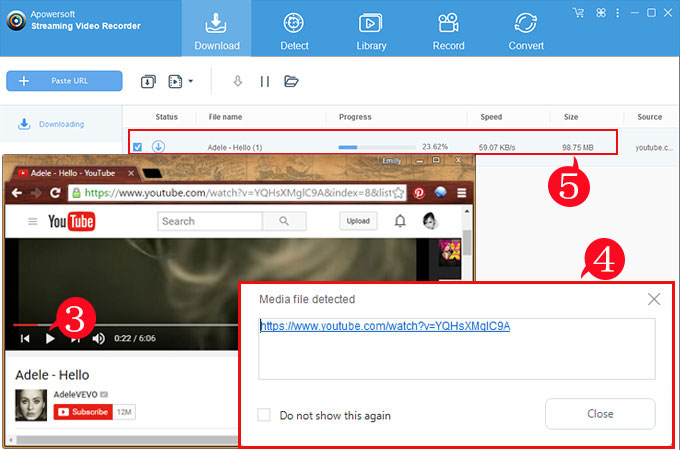
After copying and pasting the video link into download bar, it shows a pop-up window that gives you ability to download videos in your preferred formats.

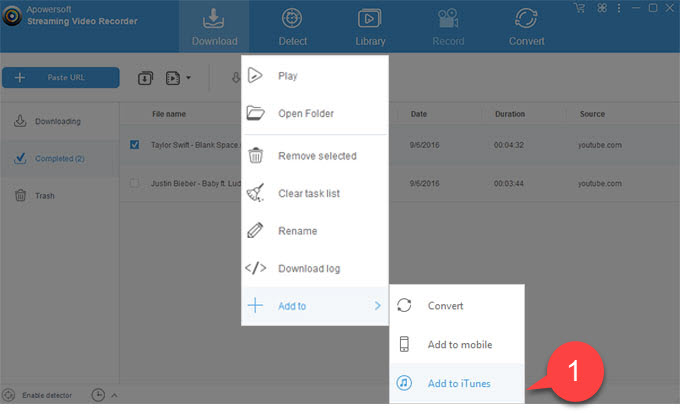
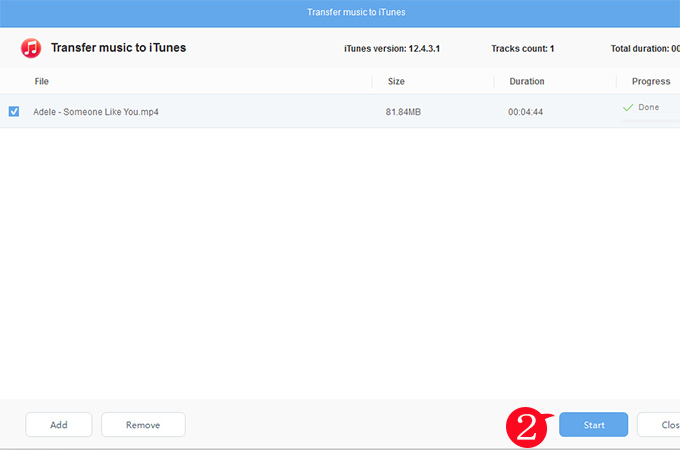
Easily Add the downloaded video into iTunes
As long as you sync iTunes to your computer, you can add videos to your iTunes so that it is easy to transfer them to your gadgets like iPad 3, iPhone 5, iPod touch and more.

* Streaming Video Recorder FAQs
1: Could not able to access the internet
3: Black box while capturing AVI Video format
4: Crashes after running Streaming Video Recorder
5: Microphone option is disabled
6: Best Settings when use Screen Recorder
7: How to record YouTube HD videos?
8: Couldn’t download videos from myvideo.de with video URL?
9: I am using Firefox, why the Streaming Video Recorder couldn't record videos?
10: Why there is no sound while screen recording?
11: Why the speaker icon shows black with an X next to it, and nothing records?
Why my browsers could no longer access the internet?
If your computer has installed some fireware software, please add the Streaming Video Recorder into the firewall's white-list.
The Streaming Video Recorder will change the HTTP proxy to monitor all HTTP traffic from Internet to your computer and detect video file then download it.
After you launching Streaming Video Recorder and starting to record video, the program will register itself as the system proxy for Microsoft Windows Internet Services (WinInet), especially, the HTTP layer used by Internet Explorer and other browsers, or many other products like Microsoft Office. You can check that whether Streaming Video Recorder has correctly intercepted requests by checking the Proxy Settings dialog. From the Internet Explorer main menu >Tools > Internet Options > Connections > LAN Setting, and finally click Advanced.

So if you close the Streaming Video Recorder incorrectly (e.g. Force shutdown, kill the Streaming Video Recorder process, Crash…), many of your software may could not access the internet any more.
In this case, there are two simple ways for you to retrieve internet access, as following:
1. Run the Streaming Video Recorder again, enable the Video Recorder, and then close the program correctly.
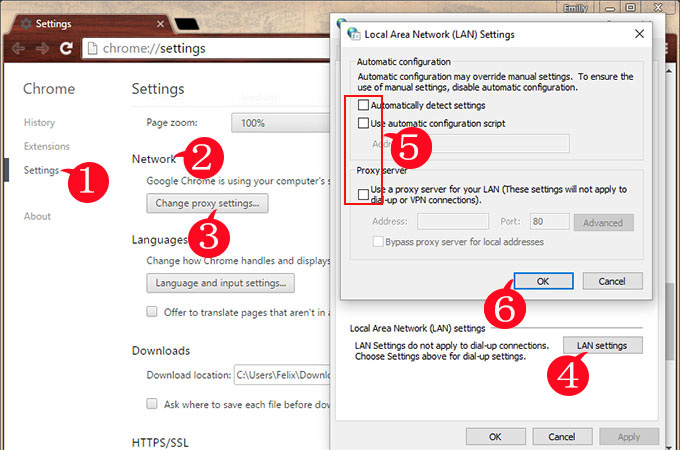
2. From the Internet Explorer main menu, click Tools > Internet Options > Connections > click LAN Setting, and uncheck the ‘Use a proxy server for you LAN’ option.

Usually, if you close the Streaming Video Recorder correctly, there aren’t any problems of your internet access.
Why Streaming Video Recorder won’t open after upgrade?
If you are using the older version, we recommend you to download the latest full version from our website:
http://download.apowersoft.net/down.php?softid=streamingvideorecorder After downloading, uninstall the old version and then install the latest version.
Everything is captured correctly, but why some videos (AVI video files) become a black box while capturing
The Streaming Video Recorder couldn’t record the DirectX Output currently. So if you are using Mplayer or VLC, you can change the output driver to Direct3D or OpenGL (gl).


Crashes after running Streaming Video Recorder, it crashes when loading as shown

This error was caused by incorrect registering components.
So just download the latest version and reinstall it, it will work well.
Note: If you are using windows 7 or Vista, please right click on icon of the program, then click Run as administrator.
Why the Microphone option is disabled?

1. Make sure that the Microphone is connected and in use.
2. Right click on the sound icon in the Notification Area and select ‘Recording devices’.
3. Set the Microphone to default recording device:

I am trying to capture a video using the record screen feature, but is there a recommended site to help me understand what the setting control and how to determine “best” settings?
We recommend you to use these settings, as shown:

Note: Higher Video Bit-rate will get a higher video quality but a bigger video size.
How to record YouTube HD videos?
Download YouTube HD videos is so easy.
Copy and Paste the YouTube video URL and then click Add to Download, the Streaming Video Recorder will ask you to choose your preferred video format to download, then you can select HD video format and click OK.
Couldn't download videos from myvideo.de with video URL?
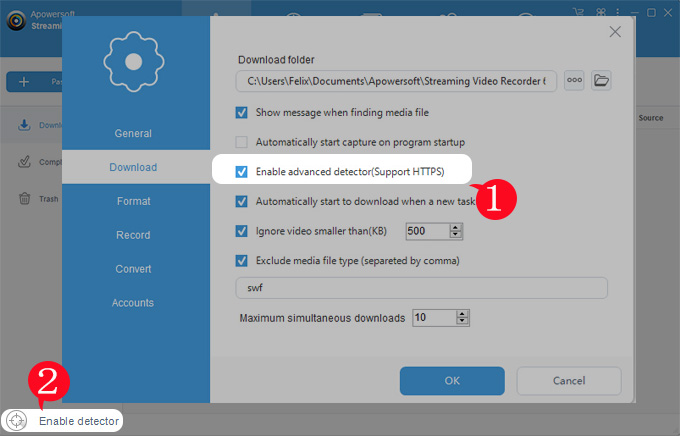
Because the myvideo.de has changed video transfer method, so we would suggest you to enable the Advanced Video Detector to download it.

Watch the myvideo.de video in the built-in web browser, and then the Streaming Video Recorder will detect the video stream (rtmp/rtmpe) and download it automatically.

And then you can right-click on the downloading item, and select Play while it is downloading.
Capturing online videos from Firefox
If you couldn't record videos in Firefox, please check the network proxy in the firefox.
- Start Firefox.
- Click Firefox -> Options

- Switch to Network tab, Click Settings.

- Make a note of the settings on this screen, adjust the settings to the values shown in the following image.
Choose the Use system proxy settings

Why there is no sound while screen recording?
If you are using Windows Vista/7 and no sound has been recorded, please do these steps to fix it.
- Right click on the sound icon in the Notification Area and select 'Playback devices'.

- Is there a Apowersoft_AudioDevice in the Sound window?

If there is no Apowersoft_AudioDevice, I would suggest you to re-install it.
During installation, if the windows ask you "Would you like to install this device software?", please click Install button to install it.
The Virtual Sound Card is an important component for recording audio what you hear, so if it was not installed, the program will not run normally.

After installation, please right click on the sound icon in the Notification Area and select 'Playback devices', you will find there is a Apowersoft_AudioDevice.
- Start recording, does it record sound now?
If it doesn't work still, switch to Playback tab, if the default sound playback device is not Speakers(Apowersoft_AudioDevice), please change it to Speakers(Apowersoft_AudioDevice) and then click OK button.

- I think it will work well now.
- Right-click on the volume icon and select "Adjust Audio Properties"

- Switch to Audio tab, if the default sound playback device is not Apowersoft_AudioDevice, please change it to Apowersoft_AudioDevice and then click OK button.

- Start to record.
Why the speaker icon shows black with an X next to it, and nothing records?
When I click the ON button in Record, the speaker icon shows black with an X next to it, and, of course, nothing records.
I have changed the speaker icon as you have directed, but that does not change the Record On button, even after rebooting and re-installing.
What is curious is that it worked earlier today with no problems whatsoever.

This symbol indicate now is silent(no sound from computer speakers or microphone).
You can disable the "Automatically skip silent passages in the process of recording" option to fix it. 
How to avoid hearing my voice as I talk though a microphone, and I'm recording with "system and microphone audio" both enabled at the same time?
If you want to record both system sound and microphone sound, you will hear your voice while recording, currently there is no good idea to resolve it.
But there are some suggestions to reduce the echo:
- Lower volume of speaker
- Move the microphone further away from the speaker
- If using a laptop microphone and speakers, try a headset instead. Since laptop microphone and speakers are fixed close together, they will usually cause echo and feedback.

thanks much such a program which ı dowloaded that ı was searching to find
The prorgram is not just very good but excellent! You have to do a little “work” to learn it, but once you do that you are far ahead of others that have “easy” instructions, but that don’t give you anything in return. Am very happy with this recorder, have spent the time to master it and now enjoy the benefit. Thanks and good luck to you people.
I appreciated that you have mastered this prog. I have a small prb. Due to low internet speeds some time the downloading video is interupted and the X mark appears ans the downloading is stopped. I sthere any way to resrart the download from the point where it was stopped.
thanks anyway
I cannot seem to get this thing to download Hulu videos. Any suggestions? It just records advertisements!
Did you ever get Hulu recording going??
New verson 2.2.6 support record screen video, so it can record hulu videos now with screen recorder.
Hi,
We will support recording Hulu.com and MTV.com later in the new version.
Any full version users will be free updated to this version.
Thanks for you support.
I am evaluating the latest version. Hulu still does not record. Any updates regarding Hulu?
The latest version is supporting Record hulu videos with built-in screen Recorder.
RSV is now the 3ed or 4th recorder I’ve tried and have been unable to record anything at Hulu… though one recorded the ads, not the show.
While the video plays fine in the IE browser, RSV doesn’t even sense a video file… so no URL aappears in the main window.
Any ideas? Thanks!
I should add some technical info about my system. It’s an HP with a duel core AMD CPU and runs Vista 32. This system has been a bitch. I’ve tried about 12 SMART programs and only one worked. Very few streaming audio recorders work. And now I’m having problems with video. Not all sites. YouTube isn’t really a problem. Hulu is. I should add that I’m running a hostlist that blocks ad sites, so maybe I should try disabling that.
Great program…How about up-streaming to a web page to share with others? Like I want to capture my vacation video and upstream it to share with my family… any ideas?
I look forward to when you have it able to pull from MTV.com — Hulu appears to work but many systems can do Hulu…
Thanks!
i got a gaotd version of streamin vid recorder and it worked fine until recently….and i know there is no support…now i get an error that it cant find my network card went i have dsl and im online all the time!
I will download site but when I enter the URL, its me not download the video I want! Is this normal?
Thank you in advance. Bisoux, Mzll-619 ..
I used to be able to record streaming audios. Suddenly, it is not recording. I played a song on LastFm, clicked on Record, but nothing happens.
Could it be something in the computer that is preventing the recording? I tried Replay Media Catcher and Wondershare Streaming Audio recorder etc., and none of them are recording.
Any help please?
If you like record streaming audio and music from online music, radio sites.
Streaming Audio Recorder developed by Apowersoft will be the best choice!
Ihave fallowed instructions on trying to record streaming video from out Church in Salt Lake City, and have failed to record anything. Actually that is not true, it worked two time when I first downloaded the Streaming Video Recorder software. Please help. I really like the software when it works. Thanks. James Bradley.
I suggest you download and install the latest version and have a try!
http://www.recordstreamingvideo.net/download-video-recorder
i’m having the latest version but it’s not working.
what gives?
I tried to use this out before I buy to see if it works (others I have tried does not) and I am glad this one really works.
I have downloaded this program…worked well for a little while..now it doesn’t automatically grab the video output…anybody have any suggestions ??
this works but can anyone tell me how to upload a video that i recorded with this to facebook? it would be appreciated
Awesome program once i worked out the quirks and downloaded a few extra files to make it compatiable. Now I can burn DVD’S AND WATCH THEM ANY WHERE -ANYTIME!
I tried to download a TV drama from PPLive that is about 43 minutes long, but somehow only 5 minutes downloaded. I really want to buy and recommend this software to all my friends if I can manage to downlod the full drama. By the way, I was trying un-attend download .. i.e. start PPLive, then streaming video recorder; when the download started then I stoped the PPlive but the downloading still continue until it said it’s completed
I want to be able to hit a record button as I am watching a DVD. I’ve checked all the DVD player softwares but none has this facility. Don’t suppose this software does either, but just thought I’d ask. I’d be very grateful if you could let me know. Thanks.
got it to record but how do you write a dvd. keep getting bad dvd when i try to play
Streaming Video Recorder does not work anymore with youtube (the whole reason I purchased it). It used to a few weeks ago. If I look at the log while recording, it lists an HTML error (404?) page not found at youtube. I’m guessing youtube has changed something in its interface that SVR was expecting and now SVR doesn’t work. I wonder if we can get a patch?
Hello,

We have test the new version, and it works well with your YouTube.
Please install new version if you can’t download youtube videos.
Regards
Jane
I recorded some video but somehow my PC shutdown by itself. When I turn it back on all my recorded video was gone. Can you please tell me where can I retrieved my recoded video.Seems that I like to purchase this program. So far so good..
Click “Settings” on the top right of the program, you can find them on the path of “Download Directory”.
Hey,
I was just asking to see if this would download NBA League Pass Broadband streams? I’d like to capture their streams and have tried a whole bunch of things. It’s difficult to capture it since it’s in some advanced type of stream. It’s not simply an FLV thing or whatever.
Ok, so I know i’m not going to be around to watch the 12 hours of sebring on saturday, and I would like the recorder to go off as soon as the race stream starts. Do I need to add the URL to the recorder first? or just have the site ready and hope it grabs the stream?
I’ve been down loading video clips from justin tv very well, but I need to know how to convert them to standard DVD player format. I’ve been doing in in Mpeg2,Mpeg3 and VCD,but They don’t play in my regular or standard DVD player . Could you please give a way to do it.
Also I have the new Streaming Video Recorder.My e’mail address is duran_marco@att.net
i download a movie using streaming recorder. but i don’t know how to burn those files on to dvd. please anybody can help me?
Burn Video to DVD, will need some professional DVD burner software.
here is the software you need:
DVD Creator – convert video to DVD and burn movies to DVD disc
When I paste a URL it always launch IE. IS there a way to force it to launch Chrome?
Hello,
Use IE will make the download process more stable.
I am recording a video now of one of my freinds being interviewed. It is a UStream video. She is in only part of the video – about five minutes out of an hour-long recording. How do I record only the part of the video in which she appears?
Hi,
1. Use latest version==>record screen video to record part of the video.
2. Use built-in video converter trim function to get the part of the video you want.
Hope this will help you!
Dear Sir/Madam,
Your stream recorder is an excellent program. However, there are some quirks such as it lost file saving directory names and says error after continue, it allow re-key in file location data. Also instead saved file as a number, why not use windows 7 that one can save as and grab the youtube’s original name so that one need not copy the youtube title and re-edit the numbered file name???
The built in player does not work, I cannot play, trim or crop the video. I have tried to install/re-install and have contacted customer support several times to help me fix this…but have not given me any response
– can someone please help and provide me with possible fixes. Thanks!
Hello,
There are must be something wrong with the video, may not supported by built-in video player.
I advice you covert this video to other format first, then trim and crop this video.
Thanks for the reply Larry, unfortunately, I have tried it with several videos. The built-in video player stopped working on my PC…I have converted videos in other format, but when I try to open the built in player, the video doesn’t play, so I can’t see where I need to trim or crop. Any advise? Streaming Video support people have not been helpful and have not even replied to my emails. Thanks!
After you convert video to AVI or other formats, please remove the file in your convert tap and re-added the file you have converted(avi or other file type, not flv format) into convert tap and edit the video,
I guess you are still using the original video file.
If you still not able to trim and crop, it may caused by your windows 7 aero.
If you are using windows 7, please disable aero and try again.
#How to disable aero in windows 7:
1. Right click the Desktop
2. Click Personalize
3. Under “Basic and High Contrast Themes”, click “Windows 7 Basic”
#How to enable aero inwindows 7:
1. Right click the Desktop
2. Click Personalize
3. Under ‘Aero Themes’, click ‘Windows 7′
Just convert your video to MP4 or WMV format with this program, and then upload them to YouTube, it can be shared with anyone you like.
Hi i have just started testing this out and like earlier posts, i was just getting adverts at the start, so i downloaded the new version and i am using the record screen function which works but i cant get any sound, any ideas.
Thanks
The latest version 2.3.8 fixed the problem of losing sound in some computer with different Sound card.
Please update your program to the latest version.
I downloaded the evaluation version yesterday and to my surprise I was able to get video downloaded quite easily. Nicely with voice and picture.
Then I ordered the registered 2.4.1 version and the problems started.
1. I am running XP on several machines. Some of them have IE6.0 installed and some have IE 8.0. If I browse to the Video site manually, I can view the video I wish to download.
But as soon as I try to use my Streaming Video Recorder ver. 2.4.1 I get error “Internet Explorer has encountered a problem and needs to close”
So three different XP machines, IE 6.0 and 8.0, all return this same error.
2. If I try to use “Record Screen” feature, I can get the video saved, but without voice. This I have tried to get down both with IE 8.0 and Firefox 3.6. Voice will never get stored. My sound card is Realtek AC-97.
I have made some quick tests also with Win 7 version, but the voice does not come down in there either. That machine has some problem with sound, but I wonder if that affects Video with Sound downloading also?
—
I still have that one snippet downloaded with evaluation version, and it has voice included. All my attempts with registered version and voice have failed.
Any suggestions?
Mark
Hi,
There is no difference between Trial and Full Version. I advice you uninstall all software first and then install the new version with your key code to have a try.
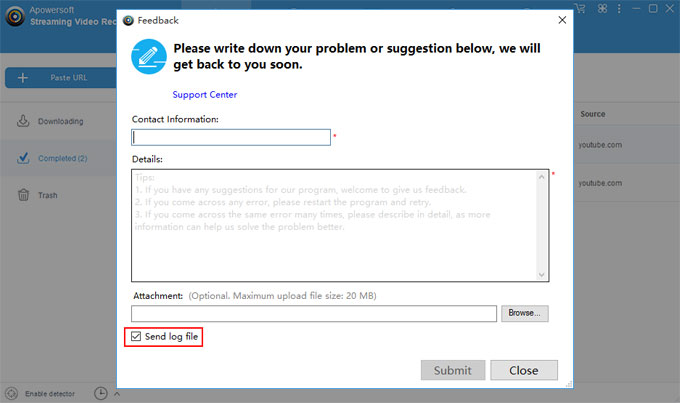
If there are still any problem, our technical have got your log file to analysis that.
Regards
Larry
Apowersoft Support
Hello,
It doesn’t work on this website:
http://www.learner.org/vod/vod_window-cc.html?pid=1928
No bubbles showed up…no detection.
Can you find a way to record this website? and I also suggest you put in the function of “recording closed caption if available”. I know another software does but that one can’t function well on my PC, so I wish your software can also have this nice add-on. Much appreciation if you can solve my problem
Hi,
I checked this website, yes, streaming video recorder can’t detect video file on this page, we will test and fix in next version.
But you can get these videos with Screen Recorder in this program, it can record any video playing on your screen with audio inside.
Record Video with Screen Recorder
Hello,
Thanks for your help!
I’ve just tried the Screen Recorder option, but it comes with 2 problems that can’t be ignored.
First, I don’t watch the video while recording, so I switched to another windows, but then I found out the recorder didn’t stay with the video screen but switched just as I did, which forces me to not just have to keep the video playing(which is OK), but I have to stay on the same windows. That’s too impossible for me.
Second, I can hardly hear the sound of the recorded video no matter what I did, either switching among the 3 options of Audio Input from “system sound” to “both system sound and microphone”, or either plugging in or out of headset. None of them would generate a distinguishable human voice. I have made sure the volume is at maximum on both video and PC system. Besides, when I started recording, my PC began to generate a high-pitched machine sound, and mostly continued until I silenced my PC or shut down the entire program.
Those problems are really serious, is there a way to fix them? Thank you.
Dear Stace,
For the first point of your problem when you are using Screen Record, yes, I agree that’s the disadvantage when using Screen Recorder, you have to stay on that window and playing the video while recording.
For your second problem, it is the screen recorder in this program; we need to update the screen recorder to latest version. We do release new version of Screen Recording Suite, but We have not renew these software bounded with screen recorder, we will do this soon.
Please check and download latest screen recorder software to have a try:
Screen Recorder 2.4 Released
Note: If you have order streaming Video Recorder, We will give you this software for free.
Anyway, we will try our best to support capture and download video directly from the video address you mentioned.
I started to try this program out and at first i couldn’t get any sound but then i got the update but sound still didn’t work so i tried it 2 or 3 times and the sound eventually worked but it was always out of sync with the video, but i seen the screen recording sweet and tried the free trial and that is a far better program the scheduled task is really good aswell but when i use that again the sound is out of sync, this is something i might purchase but only if it is working perfectly first, i am using the k-lite codec pack and watch everything on media player classic, so if anyone can help with the sound problem it would be appreciated
Hello,
We are aware of this issue and I sincerely regret the inconvenience it has caused you. Our technicians are working to resolve this matter.
Sometimes there are lag when sound from Virtual Soundcard to Real Soundcard when using screen recorder.
This problem will be fixed soon.
10th Dec,

Note:We have successfully fixed this issue and release new version of Screen Recorder, your video and audio will not be out of sync in new version, because each computer is different in CPU speed, you can even set the audio lag time yourself.
as my browsers could no longer access the internet after installing steaming video recorder i uninstall it .now i don’t what to do .i just red what you suggest to do : “Run the Streaming Video Recorder again, enable the Video Recorder, and then close the program correctly.” but now the program is uninstalled and i cannot run it ; and i cannot download it again as i have no more connection.
thank you.
Hello,
. I have a suggestion. Why dont you offer Start time and End time selection option for screen recording?. So, we can capture the screen for particular time. Thank you
I am using evaluation version of this software. You have nice interface and very useful converter option too. But i found that your software cant download RMTP videos from Youtube. But on your webpage you mentioned that it does support RMTP protocol. Then why i am not able to download RMTP videos???
Then I used screen recording option and it worked great
We are preparing for the new version which will support hulu, cbs, netfix and other similar video sites. It will released in the end of this month, then our program will support 95% video sites, if use screen recorder, 100% video sites can be recorded.
Our Screen Recorder program support create schedule recording task.
Learn more about it from here:
Screen Recorder 2.4
Hi everybody, since a few days, i am not be able to download/record videos from youtube. The program is always recording : 1.7 mib for any videos i tried to record, always the same size 1.7 mib.
I was so proud of your product since the day i got it, but for some reason i do not understand, recently, the program refuse to work well.
What can i do to get the program working well again ? I can supply some print screens to you if you want to see what i mean.
Thank you for reading.
Michel.
Hi,
Can you record a video with Streaming Video Recorder and the audio for the video with Streaming Audio Recorder at the same time? So Yes, can you please tell me how to do it.
Greetings,
Babs
Thanks for your kindly tool so I can do my educational work editing!
This program keeps auto adding videos to stream when I don’t want it to. The same videos it’s already downloading in some cases. It’s forcing me to babysit the program and remove downloads all of the time. How can I turn this feature off? I Don’t see it in the options.
Hi,
In the left corner of the program, click Disable Video Recorder.
You can turn off automatically detect and download video functions.
Im am not able to auto download and record from the above traing web site. I am attempting to save training videos we paid for and will only be available to me for streaming for 30 days. I am able to record using the screen capture function ok but am frustrated that upon completion of the recording I discovered I must be at the computer to manualy hit the stop recording button to end the recording process. Is there any setting that can auto accomplish the task to hit the stop recording button after the video is not streaming any longer? If not is there a function I can use to edit/remove the blank screen recording that has been recorded at the end of the recorded video. I can’t always be available to babysit the process to the end to hit the stop button.
X
Jim
Two choices for you:
Solution1: Screen Recording Suite have options to create schedule recording task where you set the end time to record your screen.
Solution2: After you finish the recording task, and you want to remove unwanted part, use edit functions in this program, trim your video and remove the part that you don’t want.
Learn how to trim a video
the download function has returned to not downloading files behind the family content filter. the log returns the error that the content is not available in this country
2/12/2013 12:13:41 PM: Connecting to http://www.dailymotion.com/family_filter?enable=false&urlback=%2Fvideo%2Fxmb556_hungarian-aktmodell-ep-8-finals_sexy%3Fralg%3Dbehavior-meta2
2/12/2013 12:13:43 PM:
2/12/2013 12:13:43 PM: Error:Content not Available.We are sorry, this content is not available for your country!
You were able to correct this a couple of months ago. did something change recently?
Hi,
Dailymotion has changed something, and we update new version to fix the problem, please download new version from our site.
Leave a Comment
Follow US
Follow Apowersoft
Tips and Resources
Who we are
Partners
Follow Us